
Download Tattoo Canvas – AI‑Powered Tattoo Design Tool for Artists & Enthusiasts
Overview of Tattoo Canvas
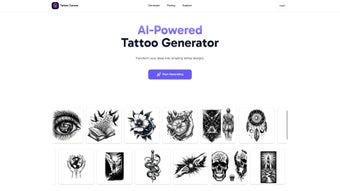
Tattoo Canvas is a next‑generation, AI‑driven design platform that turns a simple text prompt into a professional‑grade tattoo illustration in seconds. Whether you are a first‑time client searching for a personal symbol, a seasoned tattoo artist looking for fresh inspiration, or a studio manager aiming to speed up the quoting process, Tattoo Canvas delivers a seamless experience from concept to visual mock‑up. The tool supports a broad palette of styles—Sketch, Dotwork, Realism, Traditional, Japanese, Minimalist, Single Line, Tribal, Geometric, Abstract, Portrait, and Anime—so users can pinpoint the exact aesthetic they envision without scrolling through endless reference images.
In addition to classic black‑ink silhouettes, the platform offers full‑color rendering, giving artists the flexibility to experiment with vibrant palettes before committing ink to skin. All generated artwork is automatically stored in a secure cloud vault, allowing easy retrieval, version control, and sharing with clients or collaborators. Subscription plans are tiered to accommodate hobbyists, freelancers, and large studios, ensuring that high‑quality tattoo design becomes accessible without the need for manual sketching or costly outsourcing.
With its intuitive UI, real‑time preview, and powerful customization options, Tattoo Canvas positions itself as the most user‑friendly and secure solution for modern tattoo creation, while also providing the scalability required by growing tattoo businesses.
Key Features, Advantages, and Drawbacks
- AI Prompt Engine: Type a brief description (e.g., “minimalist mountain line art”) and receive instantly generated concepts that respect line weight, shading, and style conventions.
- Style Library: Choose from 12 distinct tattoo styles, each fine‑tuned to preserve authentic artistic characteristics.
- Color Customization: Switch between classic black ink and full‑color palettes with adjustable saturation, hue, and contrast.
- Cloud Storage Integration: All designs are saved securely in the cloud, with folder organization, version history, and shareable links.
- Export Options: Download high‑resolution PNG, SVG, or PDF files ready for stencil creation, client presentations, or marketing material.
- Collaboration Tools: Invite teammates or clients to comment directly on designs, approve concepts, or request tweaks within the platform.
- Multi‑Device Sync: Work on Windows, macOS, Android, or iOS and keep your projects synced in real time across all devices.
- Regular Updates: Monthly AI model improvements, new style packs, and performance enhancements keep the tool fresh and competitive.
Pros
- Fast turnaround—designs appear in seconds, dramatically reducing the ideation phase.
- Extensive style selection eliminates the need for external reference images or manual sketching.
- Cloud‑based workflow ensures designs are never lost and are accessible from any device.
- Flexible pricing models cater to freelancers, small studios, and large enterprises.
- Intuitive UI makes it accessible for non‑technical users while still offering depth for power users.
- Built‑in collaboration streamlines client approvals and team feedback loops.
Cons
- AI may occasionally misinterpret highly abstract prompts, requiring a second iteration or refined wording.
- Full‑color rendering can be resource‑intensive on older mobile devices, leading to longer processing times.
- Unlimited exports are locked behind a subscription; the free tier restricts daily design limits.
- While cloud storage is secure, offline access is limited to previously saved projects.
- Advanced vector editing features are basic compared to dedicated graphic design software.
Installation, Usage Instructions, and Compatibility
Installation Steps
- Visit the official Tattoo Canvas website and click the “Download” button that matches your operating system.
- Run the installer (Windows .exe, macOS .dmg, Android .apk, or iOS App Store link). The installer guides you through standard setup procedures.
- Accept the license agreement, choose an installation folder if prompted, and complete the installation.
- Launch the application and create a free account using an email address or a social login (Google, Apple, Facebook).
- After logging in, a short onboarding tutorial walks you through prompt syntax, style selection, and basic editing tools.
Basic Usage Workflow
- Enter a concise description of the tattoo you want (e.g., “Japanese koi fish with waves”).
- Select the desired style from the dropdown menu or the style gallery.
- Choose black ink or enable the color picker for full‑color output, adjusting saturation as needed.
- Click “Generate” and let the AI process the request—typically 5‑10 seconds on a standard broadband connection.
- Review the generated concepts. Use the built‑in vector tools to adjust line thickness, reposition elements, or add custom text.
- Save the refined design to your cloud library, create a shareable link, or export it as PNG, SVG, or PDF for stencil creation.
- If needed, repeat the prompt with refined wording to explore alternative variations.
Compatibility: Tattoo Canvas runs on Windows 10 or later, macOS 11 (Big Sur) or later, Android 8 (Oreo) or later, and iOS 13 or later. A web‑based version is also accessible via modern browsers (Chrome, Safari, Edge, Firefox) without any installation, making it ideal for quick access on public computers or shared workstations.
Frequently Asked Questions
How does the AI understand my tattoo description?
Tattoo Canvas uses a fine‑tuned diffusion model that has been trained on thousands of tattoo images and style references. When you type a description, the model parses keywords (e.g., “tribal”, “geometric”, “red”) and translates them into visual elements, ensuring the output respects the chosen style, line weight, and color preferences.
Can I edit the AI‑generated design?
Yes. After generation, the platform provides basic vector editing tools—line weight adjustment, element repositioning, color tweaking, and text addition—so you can fine‑tune the artwork before exporting. For more advanced edits, you can export the file to professional software such as Adobe Illustrator or Procreate.
Is my data safe in the cloud?
Tattoo Canvas employs end‑to‑end encryption, complies with GDPR and CCPA standards, and stores designs in isolated containers. You control sharing permissions with simple links or email invitations, and all data transfers are protected by HTTPS/TLS protocols.
Do I need an internet connection to use the app?
The AI generation engine runs on cloud servers, so an active internet connection is required for the “Generate” function. However, you can view, edit, and export previously saved designs offline, making it possible to work on the go without constant connectivity.
What subscription plans are available?
Tattoo Canvas offers three main tiers: a free tier (up to 5 designs per month), a Pro plan ($9.99 / month) with unlimited designs, priority rendering, and API access, and an Enterprise plan (custom pricing) that adds team collaboration, dedicated support, and on‑premise deployment options for large studios.
Conclusion – Why Download Tattoo Canvas Today?
If you’ve ever struggled to convey a tattoo idea to an artist or spent hours sketching endless variations, Tattoo Canvas eliminates that friction with a single, powerful AI prompt. The combination of a broad style library, instant cloud storage, and cross‑platform accessibility makes it the most efficient and secure tool for both hobbyists and professional studios. By investing in a subscription, you gain unlimited creative freedom, faster client approvals, and a reliable repository for all your design assets. The learning curve is minimal—most users create a polished concept within their first session—so you can focus on what truly matters: the art and the story behind each tattoo. Download Tattoo Canvas now, explore the free tier, and experience how AI can elevate your creative workflow while keeping your designs safe, organized, and ready for the needle.
Tattoo Canvas impresses with its speed, versatility, and cloud‑first approach. The AI produces high‑quality concepts that respect classic tattoo aesthetics, and the ability to toggle between black‑ink and vibrant color palettes is a game‑changer for client presentations. While the free tier limits daily outputs, the Pro plan offers excellent value for freelancers and studios alike. Minor hiccups with very abstract prompts are quickly resolved with a second iteration. Overall, it’s a must‑have tool for anyone serious about modern tattoo design.
- Fast AI generation
- Extensive style library
- Secure cloud storage
- Cross‑platform sync
- Free tier limits daily designs
- Resource‑heavy on older devices
- Basic vector editing only



.png)



